Angular where to store API keys: frontend vs backend
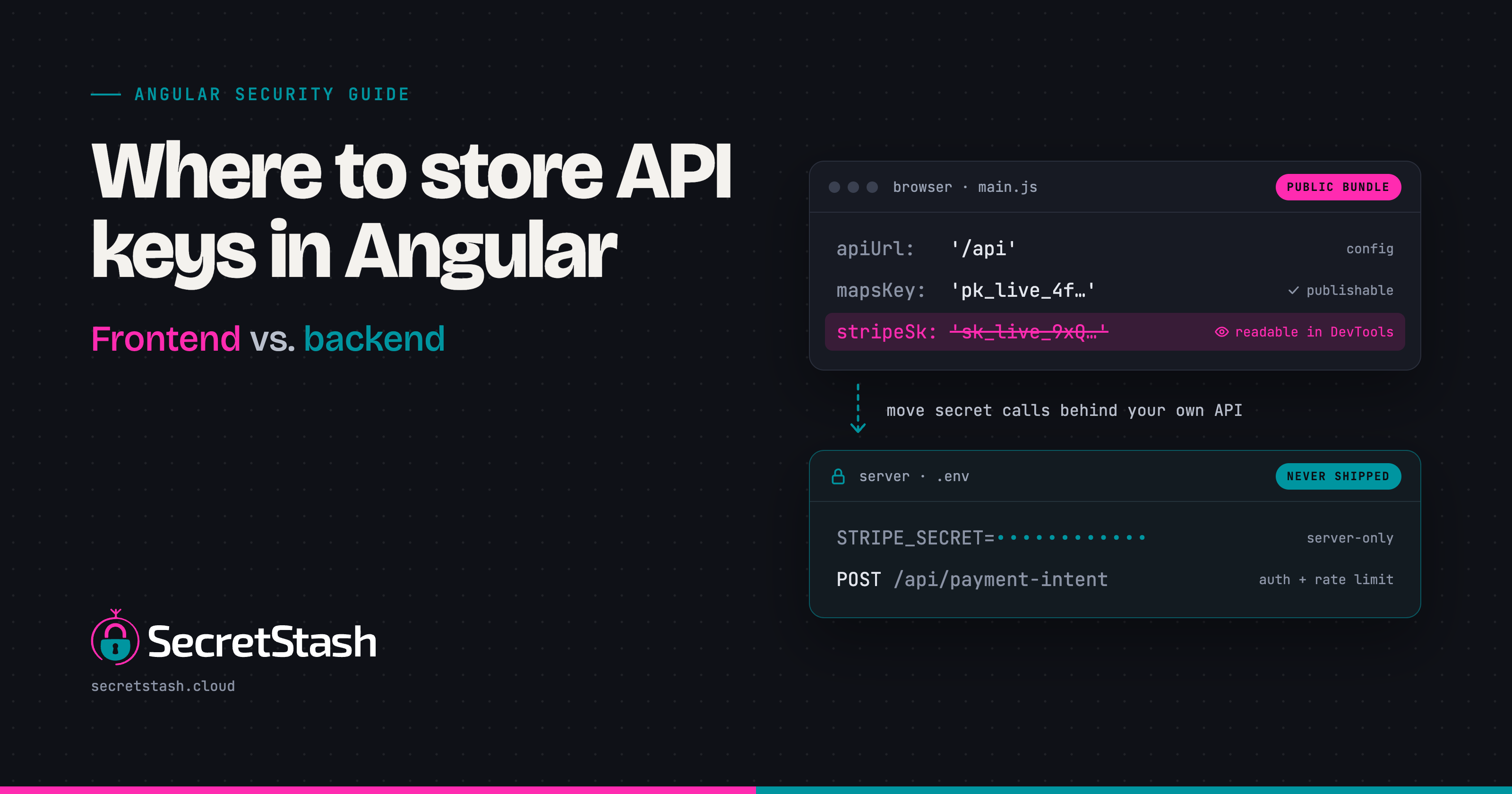
Nowhere in your Angular bundle. Anything shipped to the browser is public, so store only publishable keys client-side and keep secret keys on your backend behind a proxy or BFF, injected at build or runtime from your CI/CD pipeline. This guide maps each key type to its correct storage location and shows the Angular-specific setup.
Why can't you truly hide API keys in an Angular bundle?
An Angular app is JavaScript that runs in someone else's browser. Whatever ends up in your bundle gets downloaded by every visitor, so anything you compile into it is public by definition. There is no server-side gatekeeping step; the browser receives the full code and every constant it references.
What a bundled Angular app actually ships to the browser
After ng build, your environment.ts values are inlined into plain JavaScript files. Open the deployed main.js in a browser tab or DevTools and search for your key: it is right there, whether it sat in an environment file, a service, or a component. The Angular docs on configuration and fileReplacements describe how environment files are swapped at build time, not protected.
Why minification and AOT compilation are not obfuscation
Minification shortens variable names; AOT compiles templates ahead of time. Neither removes string literals. A hardcoded key survives both as a readable string, findable with Ctrl+F. Treat anything in the bundle as published, and keep real secrets on the server side, synced with tooling like SecretStash.
Which API keys are safe to expose in frontend code (publishable vs. secret)?
Publishable keys: designed for the browser
Some keys exist to be public. Stripe's publishable key, Firebase's web API key, and Mapbox's public token are all built for client-side use: they identify your project but can't do anything on their own. Anyone can read them in your bundle, and the vendor expects that. Their safety comes from server-side restrictions (allowed domains, referrer checks) and from pairing them with server-side calls for anything sensitive.
Secret keys: anything that can spend money or read data
A secret key is one that can charge a card, send an email, read a database, or write to production. Stripe secret keys, SMTP credentials, database URLs, and JWT signing secrets all belong here. If a key does something you'd charge for or that leaks private data, it can never ship in an Angular bundle. Obfuscation, minification, and environment files don't hide it; anyone with DevTools sees it in seconds.
The decision framework: mapping key types to storage locations
Classify every key once, then store it in exactly one place:
| Key type | Examples | Where it lives |
|---|---|---|
| Publishable | Stripe publishable key, Mapbox token | Angular environment.ts, shipped with the browser |
| Secret | Stripe secret key, DB URL, SMTP creds | Backend proxy or BFF, pulled from a secrets manager |
| Config (non-secret) | Feature flags, API base URLs | environment.ts per build environment |
| Agent/AI keys | LLM API keys your agents might read | Secrets manager with rotation, never in the repo |
Secret keys should be fetched at request time by your backend, which holds them in a dedicated store rather than a shared .env file. A tool like SecretStash keeps those server-side keys synced across staging and production without pasting them into Slack.
When are environment.ts files acceptable, and when do they leak secrets?
What environment.ts and environment.prod.ts are designed for
Angular's environment files exist to swap non-secret configuration between builds: API base URLs, feature flags, analytics IDs. The CLI replaces the file at compile time, so anything in it becomes a constant in your JavaScript bundle. The Angular CLI docs describe this as build-time configuration, not a secrets mechanism.
The build-time replacement trap: keys baked into the bundle
Because fileReplacements runs during compilation, a key in environment.prod ships in plain text to every visitor. Minification is not obfuscation; anyone can open DevTools and read it. If a value must stay secret, it cannot live in any environment file, period.
Why committing real keys to environment files fails in git and CI
Committing environment.prod.ts with real keys means every clone, every CI log, and every ex-employee holds production credentials forever, since git history keeps them even after removal. The cleaner split: environment files hold publishable values only, and server-side secrets live in a dedicated manager such as SecretStash rather than in your repo.
Should Angular apps call third-party APIs directly or through a backend proxy?
No, secret keys should never travel with your Angular bundle. Any key in your code, however obfuscated, is readable by anyone who opens DevTools. The correct architecture is a backend proxy: Angular calls your API, your API calls Stripe, SendGrid, or whoever, using the key stored server-side.
The BFF pattern: Angular talks to your backend, your backend holds the keys
A backend-for-frontend (BFF) is a thin API layer that exists only to serve your Angular app. It validates the user's session, attaches the secret key to the outbound request, and returns the response. Your frontend only ever holds publishable keys and its own auth token.
Rate limiting and key rotation become backend problems
Once the key lives on the server, you can rotate it without redeploying the frontend, throttle usage per user, and log every third-party call. If a key leaks, you revoke one server-side variable instead of shipping a new bundle and praying nobody cached the old one.
What this looks like for Laravel and Node.js teams
For a Laravel agency, the BFF is just your existing API: add a route that proxies the third-party call, read the key from your .env or secrets manager, and keep it out of any environment.ts file. Node teams do the same with an Express route. This is the model we built SecretStash around for teams of 2 to 20: the server holds the key, Angular never sees it, and onboarding a dev means granting access to the server's secrets, not pasting a .env into Slack.
What's the step-by-step setup for a proxy pattern in an Angular app?
Step 1: identify the secret-key call in your Angular service
Search your code for the key itself. Stripe is a clean example: keys starting pk_ are publishable and safe in the bundle, sk_ keys are secret and must never ship to the browser (Stripe docs on key types). Any call signed with an sk_ key, a private API token, or a basic-auth header belongs on the server.
Step 2: create the backend endpoint that holds the key
Add a route on your Laravel or Node backend that reads the key from its own environment variables and performs the third-party call. The key lives in your server's env management, never in environment.ts. Your Angular app just hits /api/create-payment-intent on your own domain.
Step 3: rewrite the Angular service to call your endpoint
Replace the direct third-party call with an HttpClient request to your backend route. Pass only what the request needs: an amount, a currency, an order ID. The response shape stays close to what the third party returns so the rest of your component code barely changes.
Step 4: lock down the endpoint with auth
The proxy is only as safe as who can call it. Require your normal session or token auth on the route, validate inputs server-side, and rate-limit it. Otherwise you have moved the abuse surface from a hidden key to an open endpoint, which is the same problem with worse visibility.
How do you inject API keys at build time versus runtime in Angular CI/CD pipelines?
Build-time: fileReplacements and CI secrets writing environment files
Angular's fileReplacements swaps environment.ts for environment.prod.ts during ng build, so each environment needs its own build. In CI, the pipeline writes the env file from a secret store variable before the build step runs. This works, but every key baked into the bundle stays in the artifact forever, and a leaked staging build exposes staging keys.
Runtime: serving config from an endpoint or injecting via index.html
Runtime injection keeps secrets out of the bundle entirely. Two common approaches: an APP_INITIALIZER factory that fetches config from your backend before the app boots, or a template that replaces a placeholder in index.html at deploy time. Both let you ship one artifact everywhere and change config without rebuilding.
Why runtime injection wins when one build serves multiple environments
If staging and production run the same commit, build-time injection forces duplicate builds and drift between them. Runtime injection means one build, one artifact, and config changes that take effect on redeploy without touching CI. For secret keys, neither approach belongs in the frontend anyway; both only apply to non-secret config, with secrets living behind your backend proxy.
How does the same problem differ in React apps and Python backends?
Where to store API keys in React app code: same bundle, same answer
React compiles to a static JavaScript bundle just like Angular, so anything you put in process.env.REACT_APP_* or a Vite import.meta.env variable ships to every visitor's browser. The publishable-versus-secret rule is identical: Stripe publishable keys and map tiles keys are fine, everything else belongs behind your own backend. OWASP's guidance on secrets in client-side code treats browser-exposed keys as public regardless of framework.
Where to store API keys in Python: .env files and secrets managers
Python backends keep secrets server-side: a .env file loaded at runtime for local development, never committed, with CI/CD pulling values from a managed store. FastAPI and Django both read from environment variables, so the injection point is process startup rather than a build step.
The shared rule: secrets live server-side, synced from one source
Whether the frontend is Angular or React, secrets sit in one server-side source and reach the backend at runtime. The frontend only ever holds publishable keys.
How should small teams store and sync the server-side keys?
The .env-over-Slack problem and its risks
Your proxy reads secrets from its own environment, so those keys still live somewhere. Passing .env files through Slack or committing them "just for CI" means every ex-dev, every contractor, and every repo clone holds production keys forever. There's no revocation trail and no way to diff staging against production when something breaks. The failure mode is quiet: a contractor's laptop gets stolen six months after the project ends, and nobody can say which keys were on it or prove they were rotated. A shared secrets store gives you one place to revoke, one place to audit, and a record of who pulled which value and when. That audit trail is what turns "we think the leak is contained" into "we know exactly which key was exposed and rotated it at 2pm."
Options compared: dotenv-vault, Doppler, Infisical, SecretStash
dotenv-vault is the lightest option and stays close to the .env workflow you know. Doppler and Infisical are broader tools with CLI syncing across environments and apps. SecretStash is CLI-first and built for teams of 2 to 20 running multiple Laravel or Node apps, so onboarding a new dev means one command instead of a Slack thread.
Where SecretStash fits, and where it falls short
SecretStash fits small teams juggling several apps and environments who want env vars out of Slack without adopting a heavier tool. It falls short if you need features beyond secrets management, or if your team outgrows flat pricing and wants broader integrations. For a 5-person agency syncing .env files across ten client projects, that tradeoff usually favors it; for anything larger, evaluate Doppler or Infisical first.
FAQ
Is it safe to put API keys in environment.ts in Angular?
Only publishable keys are safe. Environment files are inlined into the JavaScript bundle at build time, so anything in them is downloaded by every visitor and readable with Ctrl+F. Use them for API base URLs, feature flags, and vendor publishable keys. Secret keys in any environment file ship to the browser in plain text.
How do I hide an API key in Angular?
You cannot hide one in the bundle, so move the call server-side. Create a backend route on your Laravel or Node API that reads the key from its own environment variables, then have your Angular service call that route with HttpClient instead of the third party. The browser only ever sees your own endpoint.
Where do you store API keys in a frontend app?
Publishable keys belong in environment.ts or equivalent build config; secret keys belong on the backend, fetched from a secrets manager at request time. If a key can spend money, send email, or read private data, it never compiles into frontend code. Minification and AOT compilation do not hide string literals.
Can I store API keys in localStorage in Angular?
No. localStorage is readable by any JavaScript running on the page, including injected scripts from a compromised dependency or an XSS attack. A key in localStorage is as exposed as one in the bundle, with the added risk of persistence after logout. Keep secret keys server-side and rely on session cookies or short-lived tokens.
How do I use API keys in Angular without exposing them?
Use a backend-for-frontend pattern. Angular authenticates the user, then calls your own API route; the backend attaches the secret key to the outbound third-party request. Lock the route with session or token auth, validate inputs, and rate-limit it. You can then rotate keys server-side without redeploying the frontend bundle.
About the author
- I am a full-stack developer with a passion for creating intuitive and user-friendly experiences. With a strong background in frontend development and a deep understanding of backend technologies, I excel in building robust and scalable applications. My expertise spans across various frameworks and languages, allowing me to adapt to different project requirements. I am dedicated to staying updated with the latest industry trends and continuously improving my skills to deliver high-quality solutions.
Comments
Join the discussionNo comments yet. Be the first to comment.


